Introduction
In the final quarter of 2026, more applications are appearing that reproduce features of software developed over many years. This includes flagship products from Microsoft and Adobe: WordCraft is used for working with documents, while PhotoCraft reproduces Photoshop’s features. As Decrypt reports, the projects were built with help from Claude and released online as open-source software.
Companies are already building their own software instead of paying for more subscriptions. In a Retool survey, 35% of 817 respondents — customers and people building applications in that ecosystem — said they had replaced at least one software-as-a-service, or SaaS, tool. Descript has its own CRM, a customer relationship management system built on Retool that brings together data from several sources. In my view, the cost of writing software itself will tend towards zero. Maturity, security and maintenance will still take work, but I consider the direction of this change settled.
So where does a company’s value lie? In a proven business model and paying customers, alongside something I consider even more important: the data and knowledge accumulated over the years. Interest in acquiring these assets is evident in micro1’s announcement: the company announced that it would allocate a billion dollars over the following 12 months to enterprise data. This is a statement of planned spending. I consider specialised, well-organised knowledge that others cannot access the most valuable part of what a company has built. It needs to be protected, and the company needs to know how to generate revenue from it.
There is too much happening in the market to assess every solution on our own. That is why we decided to analyse the market and bring together processes and tools that can help a company move from being “human driven”, where knowledge has to be drawn out of people, through “data driven”, using organised data, to “agent driven”, where AI agents can also use the knowledge that has been prepared. This journey starts with identifying the data and includes organising it, making it available and maintaining it over time.
Where we start
Our starting point is a company whose information is scattered across people, documents and systems. The mix of sources will vary, but the review should cover six groups:
- Internal management and communication tools: Microsoft 365, Teams, SharePoint, Slack or Google Docs — including conversation threads, tasks and attachments.
- External communication: the company’s website, LinkedIn and other social media channels.
- Documents on network and local drives, in team and employee folders.
- CRM and ERP systems, for managing customer relationships and enterprise resources.
- Specialist systems, such as those supporting a production line or sales at retail outlets (POS).
- Analytical and historical data: central repositories, data warehouses and data lakes — stores that bring together data in different formats.
Where we want to get to
The company’s goal is to prepare all its knowledge for use by AI agents — programs that use a model and call tools to work with data. Access is to be provided through an MCP server. MCP stands for Model Context Protocol, a protocol that connects AI applications to tools and information sources. The knowledge should be up to date, verifiable and accessible according to permissions. Both an answer about a specific fact and an analysis of many records must also be delivered quickly enough to be useful to an employee.
Questions we address
- What needs to be done with the data, and in what order?
- Which tools should we use?
- How much work will it take to get from where we start to where we want to get to?
- How should day-to-day work and responsibility for information change so that the data available to agents continually reflects the reality of the company?
Contents
1. Taking inventory and deciding the order of data preparation
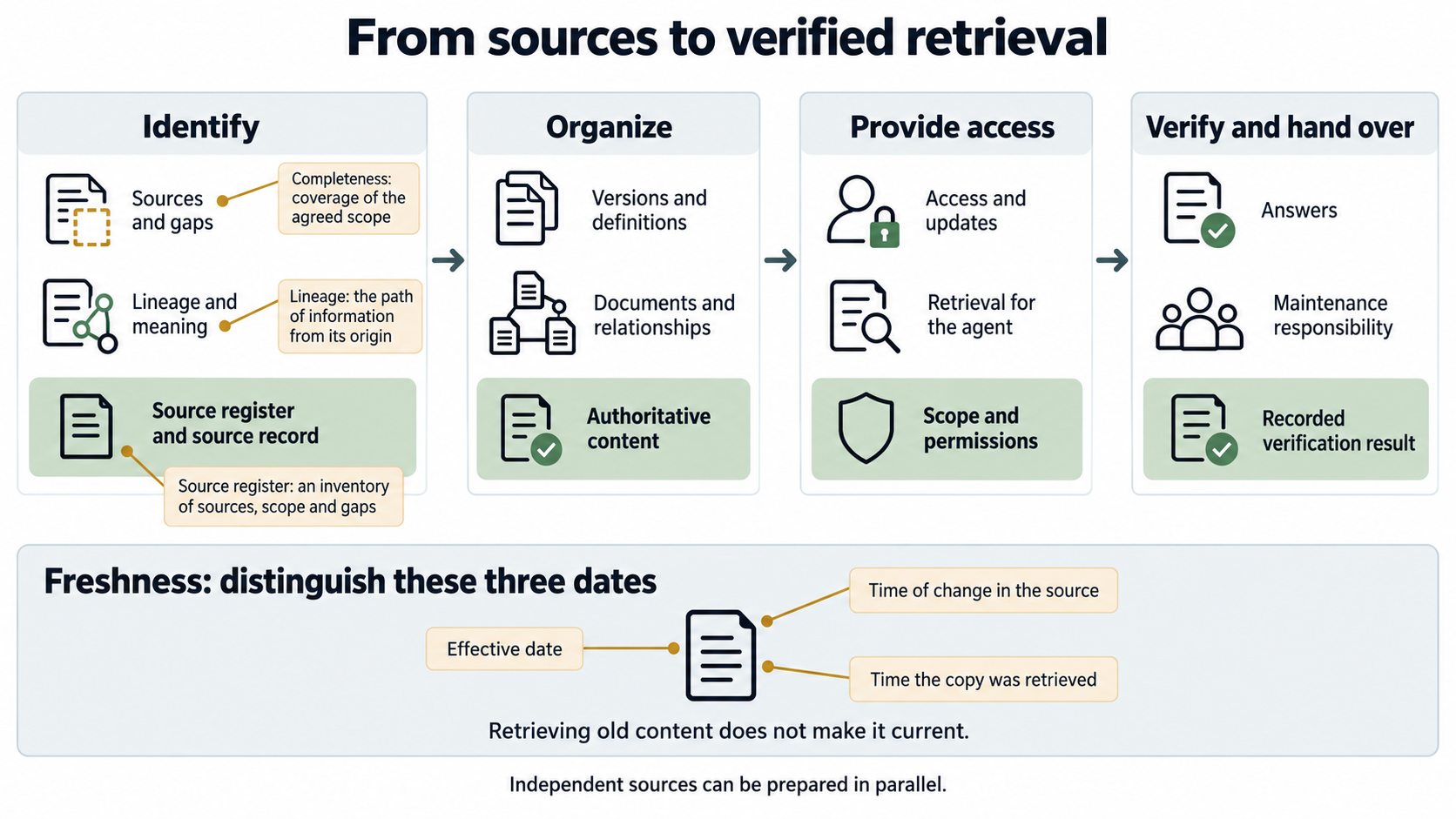
I would start by identifying sources across the company. We need a shared picture of what information exists, where it comes from and what we have not yet been able to find. This gives us a basis for deciding the order in which to organise and check the data.
1.1. A company-wide register of data sources
The work coordinator sets up a shared source register and invites representatives from every area of the company, along with administrators, to contribute. For each area, they review the six groups listed under “Where we start”. An entry might represent a document library, a communication channel, a CRM object, a dataset or an archive. Simply entering “SharePoint” does not tell us which libraries the inventory covers. A register template is provided in section 2.1.
For each entry, we record a status: identified, checked or requiring clarification. Not having access to an archive and the archive not existing are two different things. The coordinator records both situations, assigns someone to investigate and retains the date of the last check. This means the list also shows the limits of our knowledge about the company.
Example: the sales department identifies the CRM and a contract library. An employee adds that some contract amendments are still in the inboxes of the people managing the customer accounts. The register therefore covers three locations, and the amendments generate a task: identify the missing documents, move approved versions to the agreed source and check their links to customers. Reviewing the CRM alone would not establish whether the contract records were complete.
1.2. Information provenance, completeness and currency
For important information, we need to be able to trace the path from where it originates to the result made available to the agent. The source owner and an analyst record where the information is created, where copies are made and who resolves differences. We link this description of provenance to the source identifier in the register. An existing company diagram can help identify where data is passed between systems or people; I describe how to interpret it in section 2.3.
We check completeness against a defined scope: which customers, documents, periods and fields we need. Checking whether information is current requires us to distinguish its effective date, the time it changed in the source and the time a copy was retrieved. Successfully retrieving an old document still gives us an old document. The owner sets the required freshness, and the administrator checks whether it is maintained along the entire path by which the information is made available.
Example: a contract sets a payment term, a later amendment changes it, and the CRM still holds the previous value. The person responsible for contracts confirms the amendment’s effective date and identifies the authoritative source. The CRM custodian corrects the record. A link to the amendment and the decision remains in the register, so the next answer can be compared with the correct version.
1.3. A data preparation plan and acceptance criteria
The register becomes a work list in a shared spreadsheet or task management tool. Each row has a source ID, a person responsible and evidence of completion. I suggest the following order; tasks for independent sources can run in parallel.
| Task | Required input | Who does the work | Recorded result and acceptance criterion |
|---|---|---|---|
| Identify sources and gaps | List of company areas and the six groups under “Where we start” | Coordinator, employees and administrators | The register covers every area; someone is responsible for clarifying any unknown scope. |
| Establish provenance and meaning | Register entries, data samples, diagrams | Source owner with an analyst | The source profile makes it possible to trace a sample back to where it originated. |
| Resolve versions and definitions | Conflicts, copies, unclear fields | Business owner | The glossary and recorded decisions identify the authoritative version and the meaning of the data. |
| Organise sources | Agreed rules and a list of gaps | Document custodian or data engineer | Corrected documents, keys and relationships pass a sample check. |
| Prepare access and updates | Prepared sources and approved audience groups | Integration administrator | The configuration record and a test demonstrate the retrieval of changes and deletions, and the correct permissions. |
| Give the agent read access | Prepared source, index or database | MCP layer administrator | The tool description defines its scope; the result retains the source identifier and its as-of timestamp. |
| Check answers | Reference questions and answers | Data owner with a tester | The results register covers a specific fact, a dataset analysis and denial of access. |
| Hand over maintenance | Acceptance results and remaining gaps | Source owner and integration maintainer | Responsibilities, backup cover and the method for rechecking after a change are recorded. |
This sequence prevents data from being organised according to rules that have not been agreed. We first need to establish what “active customer” means in the company so that we can prepare the filter correctly. We first need to identify the authoritative version of a document so that its passages can be included in search. Source acceptance closes the task only once the check result has been recorded.
2. Tools for gathering and organising knowledge
The starting point is the sources the company already uses. The register can begin as a shared spreadsheet, with tools for scanning, reading documents and synchronisation selected to address the gaps identified. For each choice, it is worth specifying the input, the recorded output and the person who will confirm that it is correct.
2.1. A shared source register and templates for employees
In a company using Microsoft 365, the register could take the form of Microsoft Lists. The tool can create lists from sources such as Excel, CSV or a template, and provides a form for adding entries. The coordinator prepares the columns, while the administrator configures access, versioning and approvals. A shared Excel file can hold the same set of fields; editing and approval rules then need to be agreed for the chosen storage location.
| Register field | What to enter | Who completes or approves it |
|---|---|---|
| ID, area, system and address | A unique identifier and storage location | Coordinator and administrator |
| Data type and scope | Types of documents or records, folders, period and dataset boundaries | Employee who uses the source |
| Provenance | Where information originates, where it is copied from and where it goes | Employee who creates the data, with help from an analyst |
| Owner and custodian | Who decides what the data means and who makes corrections | Person responsible for the area |
| Definitions and version | Meaning of fields, authoritative version, available history | Business owner |
| Coverage and gaps | What has been checked, what is missing and what is still unknown | Coordinator, after comparing employee submissions with retrieved data |
| Updates | Event that triggers a change, effective date and refresh method | Owner and integration administrator |
| Access | Audiences, restrictions and the account used for retrieval | Administrator; the owner approves the scope |
| Check and next action | Date, sample, link to the result, error and person responsible | Tester and coordinator |
The employee receives a form with these fields and completes the part relating to their knowledge: what they record, where, where they get the information, which exceptions they know about and who can resolve them. They can select “I don’t know”. The administrator fills in identifiers and access details, the owner confirms the meaning, and the coordinator merges entries relating to the same source. The result stays in the shared register; additional explanations go into the linked source profile.
Example: the profile “D-014 / sales / contract library” contains the library address, the scope “signed contracts and amendments”, the owner in sales and the authorised audience group. The “gaps” field identifies a missing amendment for customer K-124, while “next action” names the person who needs to confirm its version and add it to the library. The empty history field has its own status: “to be established”.
2.2. Connectors and an agent to support the inventory
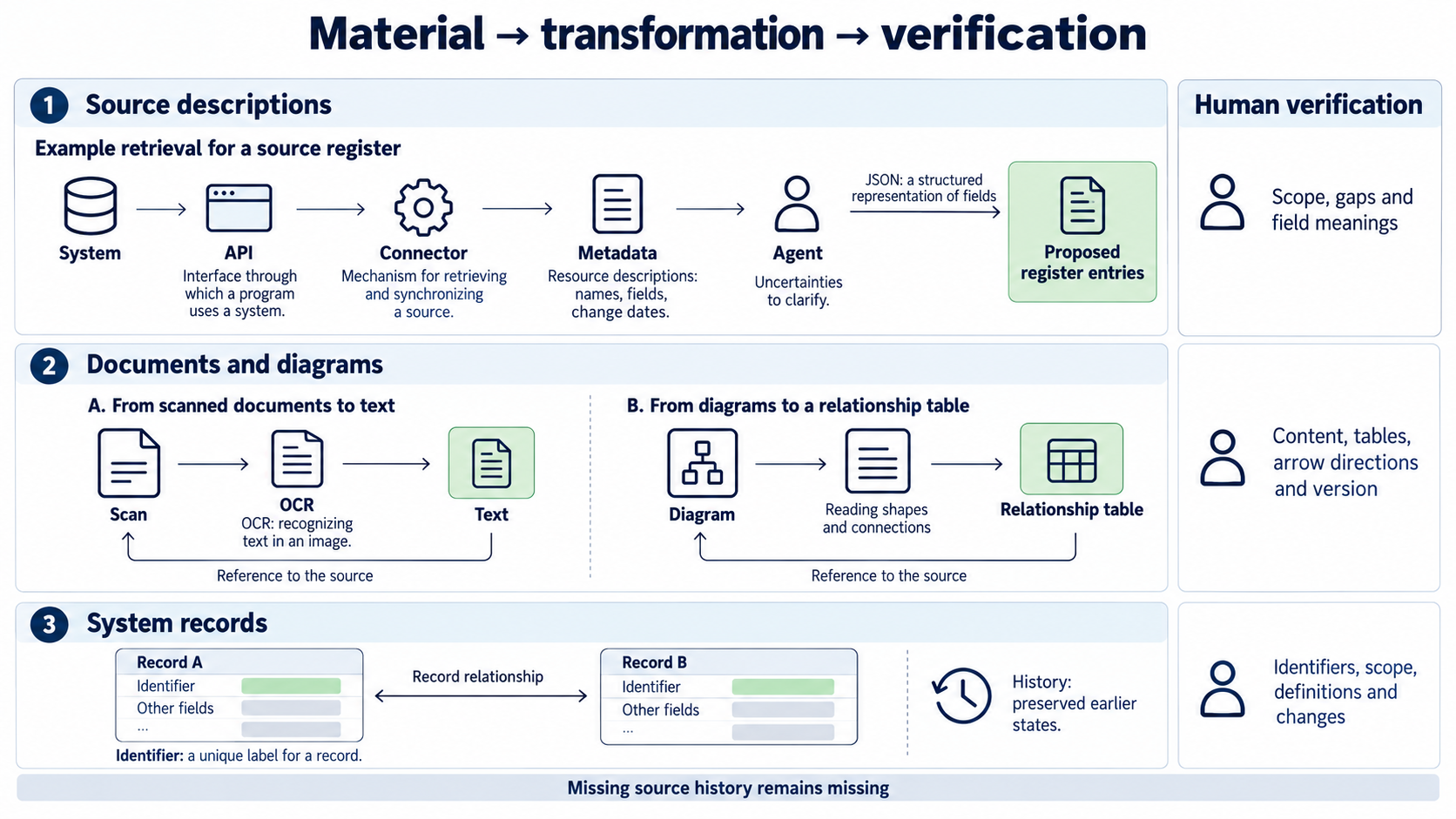
An API is an interface through which a program can use a system. A connector reads and synchronises a source through such an interface or another available route. The administrator defines the permitted scope, then collects metadata — descriptions of resources, such as folder names, table fields, identifiers and modification times. An agent can organise this material according to the register schema and identify questions that require human knowledge.
In an environment with Microsoft Purview, scanning retrieves metadata into a data map and catalogue. The administrator selects the source and scan scope, then compares the resources found with the list of expected resources. The result goes into the catalogue, from which the findings can be linked to the company’s register. The read scope and level of metadata depend on the source and connector. The owner still needs to confirm the meaning of fields and account for missing locations.
A large language model, or LLM, can be used through an agent such as Codex to organise exported descriptions. Codex’s non-interactive mode accepts a required JSON schema — a structured specification of fields — and can save the result to a file. A technical specialist can therefore supply an agreed metadata extract and receive a file for import along with a list of gaps. Schema validation checks the format, while the data owner checks the meaning assigned to it.
- The administrator records the read scope: system, folders or objects, period, account used and excluded locations.
- The agent proposes register entries, groups similar names as candidates for review and flags uncertainties.
- Employees fill in gaps, and owners decide whether similarly named resources mean the same thing.
- The coordinator imports approved entries and compares coverage with the list of company areas. Gaps remain on the work list.
Example: the agent finds “status” fields in both the CRM and ERP. It records both with their sources, without merging the definitions. An employee explains that the first describes the stage of contact with a customer, while the second describes the state of an order. The register gains two concepts and a description of the relationship between the records.
2.3. Interpreting existing company diagrams
If the company has a library of diagrams, it is worth using it to find sources and information handoffs. I pass such materials to Codex myself to help interpret them. When working as a team, I would also retain the diagram version and a record of the interpretation: which finding came from which page, label or connection. Someone familiar with the area compares the result with the drawing and how the work is actually done.
| Diagram source | How to obtain the material | Output to use in the register | What a person checks |
|---|---|---|---|
| Miro | The administrator uses the board items API and the documentation on connections between items. | An extract of labels, objects and relationships, with a reference to the board, saved with the source profile. | Whether the read covered the right items; a pasted image may require separate interpretation. |
| Diagrams.net / Draw.io | The diagram author exports it to XML, including the required pages. | A file describing shapes and connections, used to create a table of systems and handoffs. | Page coverage, arrow directions and the meaning of abbreviations; extracted labels alone are not enough. |
| Visio | A technical specialist prepares an extract from the VSDX file, a package containing XML parts. | A description of pages, shapes, text and relationships, with their locations in the file. | The completeness of the extract for that diagram; the VSDX description does not cover the older binary VSD format. |
An image of the diagram is an alternative: Codex CLI supports image input. The request to interpret it should cover systems, inputs and outputs, storage locations, named responsible people and uncertainties. We save the result as a table linked to the original. An employee checks the text and arrows, an administrator confirms the connections, and only approved findings are added to the register.
Example: a diagram contains the sequence “web form → CRM → ERP” and a side arrow “cennik.xlsx → quotation”. Reading it reveals an additional source of prices. The interpretation table retains questions next to the price list: where is the file stored, who approves it, and how can the authoritative version be identified? A sales employee supplies the answers, the administrator checks the actual data transfer, and the coordinator assigns the source an ID. The diagram has helped identify a gap in the catalogue.
2.4. Tools for organising documents and system data
A document requires its content, version and the location of a quotation to be preserved. A system record needs unambiguous identifiers and relationships. An answer about the past also requires historical data. These differences help us choose a tool and a way to check its output.
| Task and tool | Input → recorded output | Preparation and checks |
|---|---|---|
| Reading documents: Docling | PDFs, office documents or scans → document structure and passages for subsequent retrieval. | The custodian identifies the authoritative version. A technical specialist preserves the address and passage location, while an employee compares tables, numbers and dates after OCR, the recognition of text in an image. |
| Retrieving Salesforce records: Airbyte | Available source objects → records in the configured destination. | The administrator selects objects and the synchronisation mode. The analyst compares identifiers, scope and a sample of records with the source system. |
| Capturing PostgreSQL changes: Debezium | Initial database state and its change log → a stream of events for further processing. | The data engineer checks read continuity, changes and deletions, and their links to business identifiers. |
| Standardising calculations: dbt Semantic Layer | Data models and agreed metric definitions → shared rules used in queries. | The analyst agrees the meaning of the metric with the data owner and compares the result with a reference query. |
For a document, I would retain the source ID, original address, version, effective date, retrieval time, owner and access rules. For records, I would also retain what a single row represents, the units, time zone and join rules. If a system stores only the latest status, the absence of earlier history needs to be explicitly flagged. A connector cannot recreate events that the source did not retain.
For specialist systems, the same elements need to be checked using their own data. The Square Orders API provides order data from the sales system; retrieved records can feed a prepared analytical dataset. The documentation highlights the creation time of an order from a point of sale working offline: it may be the time the server received it. The administrator and data owner should confirm what the dates mean before an analyst joins them to another source.
Example described by the vendor: TIME uses Glean to access its archive. The account shows material being indexed, searched and summarised, with links to the content. It is worth examining as an example of making historical documents accessible while allowing users to return to the source; the scope and versions of your own archive need to be established separately.
3. Making data available to agents while preserving permissions
Once the sources have been organised, they need to be connected to the agent in a way that preserves provenance and access boundaries in the answer. The read method depends on the type of question, and checks cover the entire path from source to answer.
3.1. The MCP access layer and source permissions
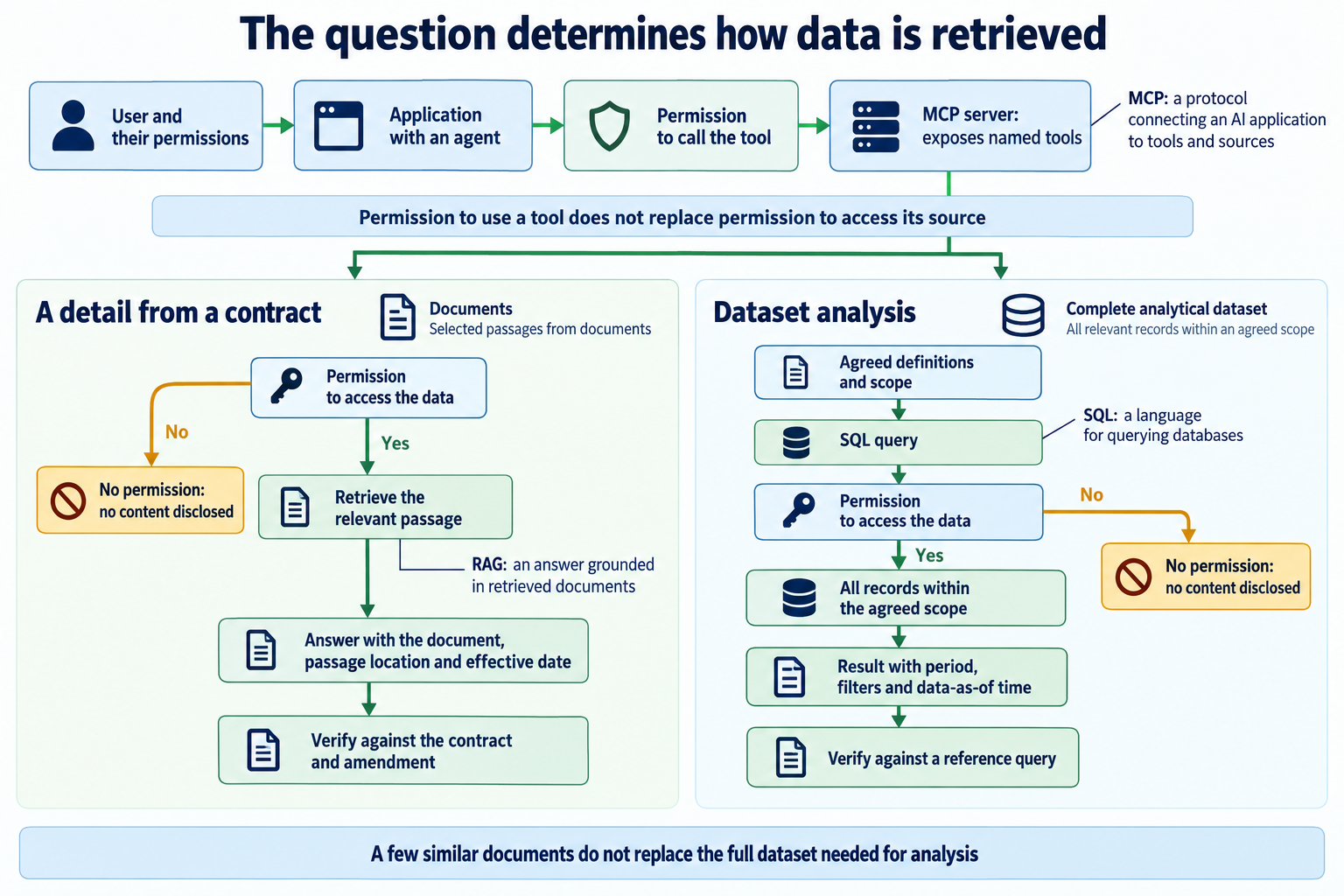
In the MCP architecture, an AI application connects to servers that expose tools and resources. A company server can expose named tools for reading prepared data. Documents can remain in their library, records in the CRM, and summaries in an analytical database. One application can use multiple servers, so a complete catalogue of company knowledge does not require moving all data into a single store.
- The source owner specifies the information to be shared, its meaning and its audience groups.
- The connector administrator records the retrieval scope, refresh method and handling of deletions.
- The person preparing the index or database preserves source metadata and access-filtering rules.
- The MCP administrator describes the tools, parameters, read restrictions and the identity whose permissions they use.
- The tester checks that the result for a given user contains only data available to that user and points to the correct source.
We consider catalogue scope and permission scope separately. In Onyx, a connector retrieves sources for search, and the Public setting makes them available to Onyx users even when the document is private in the source. Permission synchronisation is an Enterprise feature and depends on the connector and authentication method. Before making the data available, the administrator therefore checks what actually appears in results using two accounts. Similarly, permission to call an MCP tool does not replace permission to read a document or table.
Example described by the vendor: Electra connected Intercom, Slack and Notion in Dust, along with its own MCP for backend data, including charging sessions, accounts and payments. An employee checks the answer before sending it. This account shows how knowledge from documents and communication can be combined with reading system data.
3.2. Data for factual questions and analyses
A question about a term in a contract and a question about an entire quarter of orders require different data preparation. In the first case, we are looking for the provision currently in force. In the second, we need a complete dataset and agreed calculation rules. The examples below are illustrative.
| Element | Example: a specific fact | Example: dataset analysis |
|---|---|---|
| Question | What payment term applies to customer K-124? | What percentage of orders were delivered after the promised date in the last completed quarter, by region? |
| Required data | Contract, amendments, customer ID and effective dates. | Orders, promised and actual dates, statuses, regions and the required change history. |
| Defining meaning | Resolve versions and exceptions to the terms. | Choose the date that determines the quarter; set rules for cancellations, partial deliveries, missing dates and counting. |
| Read method | Find the correct document and the passage confirming the term. | Run a query covering all records in the agreed population. |
| Answer | The term, with the document identifier, location of the provision and effective date. | Results by region, numerator and denominator, period, filters and the as-of timestamp for the data. |
| Check | An authorised person compares the answer with the contract and amendment. | An analyst compares the result with a reference query and checks a sample of records and exclusions. |
For prepared analytical datasets, one example is BigQuery with MCP tools. It provides metadata reads and SQL queries — queries against a database. The administrator selects roles and tools appropriate for read access, while the analyst saves the result with the query and checks it against the same population. A Google Cloud article shows tools for listing datasets and tables and running queries; a video by Abirami Sukumaran explores making datasets available to MCP clients in more detail.
Finding a few similar documents is not a sufficient basis for calculating a percentage for the whole company. History matters just as much: if only the latest promised delivery date was retained, the earlier commitment may no longer be available. The analyst records that gap against the question and source instead of calculating a result using data that does not match the required scope.
Example: in response to “What themes come up in complaints?”, an agent can synthesise the documents. The dataset owner defines the channels and period, the analyst links messages belonging to the same case, and the result identifies material supporting each theme. If we want to report how often the themes occur, we also need to decide whether we are counting messages, cases or customers.
3.3. Checking answers, freshness and access
The data owner prepares reference questions and answers, and the tester records results in a shared validation log. Each entry contains the question, account or role used, source and version, expected and actual result, date, response time and a link to the evidence. Each discrepancy is assigned to someone responsible for the correction, and the result of the recheck is recorded.
| What we check | What evidence we look for |
|---|---|
| A known detail and a dataset analysis | Agreement with the document or reference query, using the same definitions and scope. |
| Missing information or a conflict | The gap or discrepancy is identified without adding an undocumented value. |
| A user without access | No disclosure of inaccessible content, a passage or the document’s name. |
| A content change | A record of when the source changed and when answers began using the new version. |
| Deletion or withdrawal | Confirmation that old content has disappeared from current reads or is correctly marked as historical. |
| Revoked permissions | Repeating the question shows that the content is no longer available to that person. |
| A field or definition change | The difference is detected, the mapping is corrected and the result agrees after rechecking. |
| Response speed | Measurements for representative questions, result sizes and a stated load. |
A technical example of such a solution is azure-search-openai-demo: the application answers using retrieved documents, an approach known as RAG. The authentication and access-control guide describes Microsoft Entra configuration and document permissions. A technical team can use the demo to work with a prepared sample, retain the question results and check them using accounts with different permissions. Protection features require configuration. A Microsoft Reactor video on data access in RAG applications explores the topic further.
Example described by the vendor: OpenAI describes expert assessment of answers and the development of an evaluation question set at Morgan Stanley. The practice itself is worth adopting: someone who knows the data prepares the reference answers, and subsequent versions of the solution are tested against the saved set of questions. Your own results remain the basis for accepting your company’s sources.
4. The work involved in preparing and maintaining data
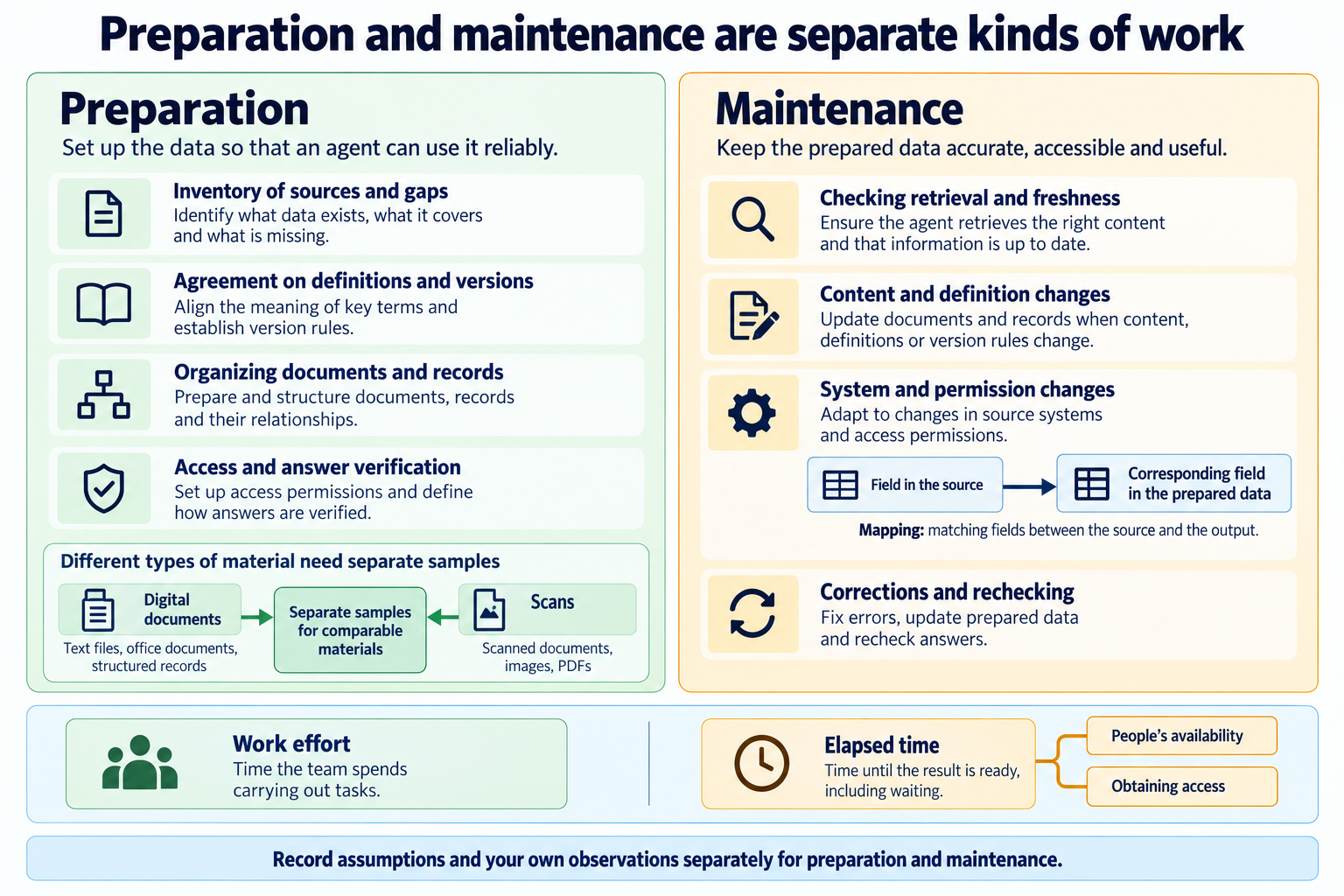
The best way to estimate the effort is to use your own sources. The number of systems tells us too little: one library might contain well-described documents, while another contains scans, duplicates and unresolved versions. Preparation work and the subsequent handling of changes need to be estimated separately.
4.1. One-off work and team involvement
The coordinator creates an effort spreadsheet linked to source IDs. Together with the people doing the work, they divide the material into groups of similar difficulty: for example, digital documents and scans, sources with an existing read interface and those needing a new connection, and data with agreed or unclear definitions. For a sample from each group, they record the number of units, working time by role, corrections and reasons for waiting. This measurement is used to estimate the remaining scope; the source review still covers the whole company.
| Task | Scale and assumptions to record | Team involvement | Work output | Effort estimate to fill in |
|---|---|---|---|---|
| Source inventory | Company areas, known sources and unidentified locations | Coordinator, employees, administrators | Register of coverage and gaps | Remaining work: (sample working time ÷ number of sources in the sample) × number of remaining comparable sources. Add the time spent on the completed sample and clarifications to the total effort |
| Agreeing meaning | Disputed concepts, versions and exceptions | Data owners, analyst | Glossary and decisions | Time spent in meetings and working in the sources |
| Organising documents | Number and type of documents, OCR, tables, duplicates | Content custodian, technical specialist | Checked representation with provenance | Measurements for each document group and observed corrections |
| Preparing records | Datasets, keys, relationships, missing fields and history | Administrator, data engineer, analyst | Linked and checked data | Time spent on mappings, filling gaps and checks |
| Access and updates | Accounts, roles, connector readiness and source limitations | Administrators, data owner | Reads consistent with scope and access permissions | Configuration work; waiting time for access recorded separately |
| Acceptance | Question types, roles and edge cases | Owner, analyst or tester | Check results and resolved defects | Preparing reference answers, running checks, correcting and rechecking |
The estimate consists of shared work, work that depends on the scale of the sources, and corrections observed in the sample. It is worth recording a range and its assumptions rather than a single number that hides differences between materials. We establish elapsed time separately: it depends on owners’ availability, obtaining access and task order. A few hours of work spread across several people can mean a much longer wait for a finished result.
Example: the sample shows that digital contracts retain readable tables, while older scans require manual comparison of dates and amounts. The coordinator separates these groups in the spreadsheet and measures them individually. Using one average for the entire library would hide the work on scans and the number of corrections needed.
4.2. Ongoing change handling and data quality
Once access is in place, the effort spreadsheet should have a second part: maintenance. Source custodians and integration maintainers record routine activities and work triggered by changes. They derive frequency and time from observations of their own data, issue reports and retrieval logs.
| Type of work | Example scope | What to measure |
|---|---|---|
| Routine checks | Correct retrieval, data freshness and handling issue reports | Check frequency, working time, and the number and types of defects |
| Content and definition review | Outdated documents, changed concepts, unidentified owners | Review scope, time spent reaching agreement and making corrections |
| System or source change | A new field, API, format, dataset or access method | Time to adapt mappings and repeat acceptance checks |
| Permission change or data withdrawal | A new audience group, revoked access, removal of a source | Time to update configuration and check the effect in the answer |
The plan for the next period includes the expected number of these activities and changes, multiplied by the observed effort for each type. A new system or a major source redesign requires a separate estimate. After the first maintenance period, the coordinator compares the plan with the work recorded and updates the assumptions.
Example described by the vendor: the account of Fluxym and support from Wesype describes an administrator’s involvement in connecting SharePoint and Salesforce and helping employees. It is a useful reminder to allow for people’s work on sources and access. The account does not provide a complete breakdown of hours spent maintaining data across the company.
5. Responsibilities and rules for maintaining data
A prepared dataset starts ageing as the company continues to change. Keeping it useful requires clear decisions about who determines what information means, who corrects the source and who confirms that the agent is already using the new version.
5.1. Source owners and agreement on definitions
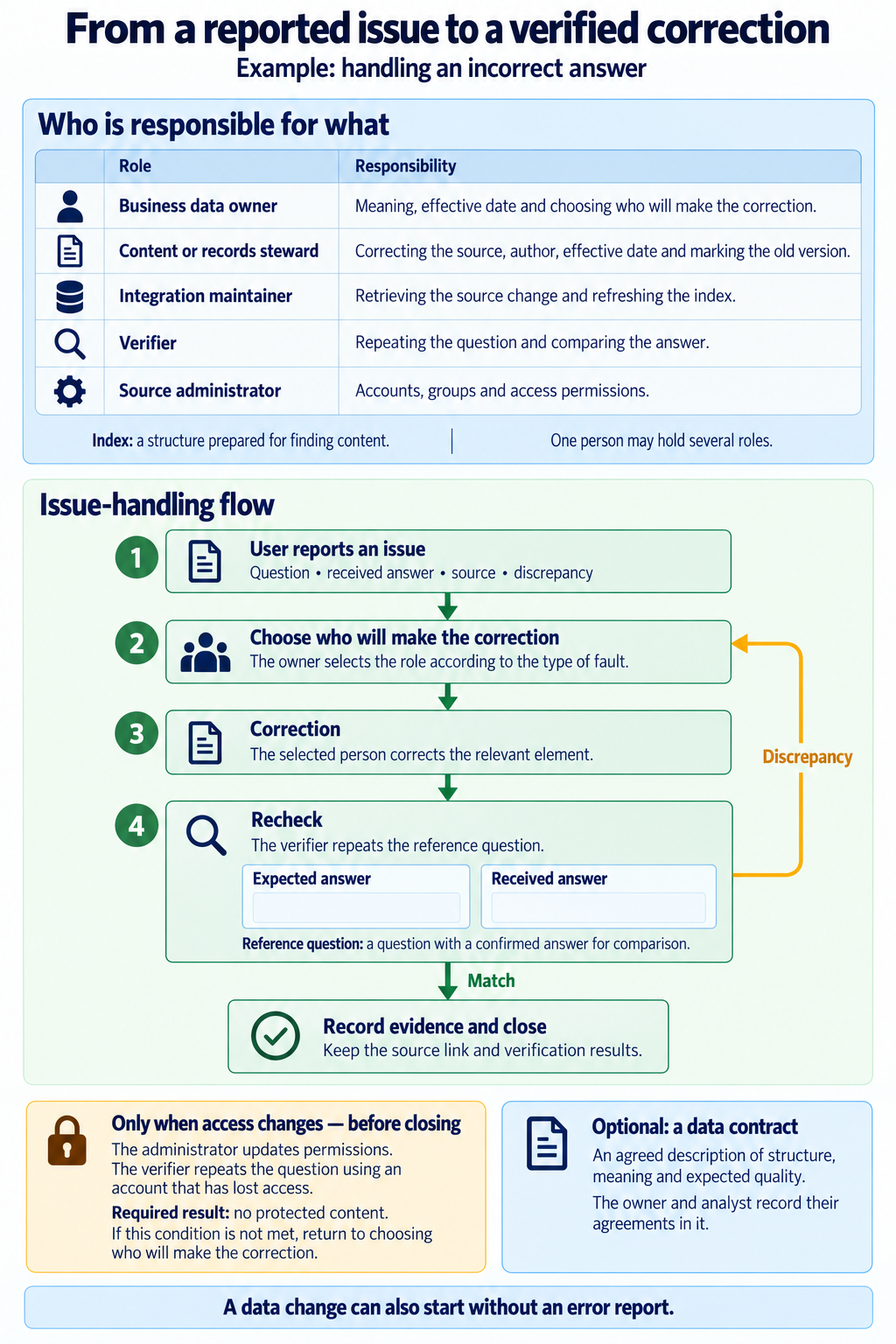
The business owner of a source should have the authority to decide which information is authoritative and what the terms in use mean. The administrator is responsible for technical access but should not independently define “active customer” or the rules for classifying a delivery as late. We record roles and backup cover in the source profile.
| Role | Data responsibility | Where it is recorded |
|---|---|---|
| Business owner | Definitions, authoritative version and resolving conflicts | Source profile, glossary, approval history |
| Content or record custodian | Make the correction, mark the version and effective date | Source system |
| Source administrator | Accounts, groups, access and schema changes | Configuration and change register |
| Integration maintainer | Retrieve changes, refresh the index, handle deletions and failures | Synchronisation log and defect list |
| Reviewer | Compare the answer with reference material | Register of questions and results |
| Person using the answer | Report a gap or error with the question and source | Issue-reporting form |
In a smaller company, one person may hold several roles. It is still worth distinguishing the decision, the correction and the check in the record. A new definition should have an author, an effective date and an indication of the datasets it applies to. This prevents a change in a field’s meaning from remaining confined to a conversation between a few people.
If the company uses a data catalogue, it can record these agreements as data contracts: an agreed description of the schema, meaning and expected quality. OpenMetadata documents contracts assigned to assets. The owner and analyst record the rules in them, while a technical specialist runs the available checks and keeps the results with the asset. Rules requiring business judgement are still checked by a person.
5.2. Business changes as triggers for data updates
A change to contract terms, a price list or a definition needs to be linked to an update in the appropriate source. I suggest that the task for such a change also include information about its effect on the data made available to agents. The source custodian and integration maintainer then follow the same sequence:
- Record the change in the agreed source, with an author and effective date.
- Mark the old version as historical or withdrawn from current use.
- Check that the new content has been retrieved and the copy or index updated.
- Repeat the reference question and compare the answer with the new state.
- If access has changed, also check the result using an account whose permissions were revoked.
- Close the task with a link to the source and check results; route any discrepancy back to the appropriate person.
Example: the amendment for customer K-124 has been signed, but the agent still gives the old payment term. The contract owner confirms when the amendment takes effect, and the library custodian updates the relevant labels. The integration maintainer checks whether the read includes the amendment and whether the old passage is still being returned as current. An authorised employee repeats the question. The issue record retains the document, date and correct answer.
Content changes, document deletion and access revocation may be handled by different mechanisms. We therefore record separately in the source profile how to check each of these events. A successful refresh message alone is not enough to close all three cases.
5.3. Working habits and reporting data errors
Whether data reflects reality also depends on where employees record decisions and how they report mistakes. In GitLab TeamOps, shared knowledge rests on a documented information source. KCS, a method of working with knowledge, describes a consistent content structure and distinguishes between making a correction yourself and flagging an error for repair. These practices can be translated into rules for company sources.
- A decision that changes information is recorded in the agreed source. A link to that record is left in the conversation or message.
- A new document uses a shared template with an owner, effective date and version status. The author fills in these fields before sharing it.
- An employee with permission to make corrections updates the source and describes the change. Someone without that permission reports the error through a form linked to the source profile.
- An issue report about an agent’s answer contains the question, the answer received, the cited source and a description of the discrepancy. The user does not have to identify the technical cause.
- The owner assigns someone to make the repair, and closing the issue requires the result of asking the question again. The correction remains in the source so that later users and reads can benefit from it.
The aim is to keep detecting discrepancies and shorten the time they persist. When an employee sees that a report led to a correction in both the source and the answer, they have a reason to use the same route next time. The defect register also helps identify sources that need a broader review.
6. A data-readiness checklist for agents
I would involve source owners, administrators and the people checking answers in accepting the prepared data. Each point below should lead to an existing record or check result.
- The register covers all company areas and the six source groups under “Where we start”; it also flags absent groups, unknown scope and sources that are not yet accessible.
- Every source made available has an owner, provenance, scope, definitions and an identified authoritative version.
- Documents and records retain identifiers, and history is available wherever the question requires it.
- Diagram interpretations and additions made by agents have been checked by people familiar with the sources.
- A question about a specific fact and a dataset analysis have produced results that agree with the reference material, with links to that material.
- Content changes, data withdrawal and access revocation have been checked along the entire path to the answer.
- Response time has been measured under stated conditions, and the required freshness has been defined for each source.
- The effort spreadsheet separates preparation from maintenance and retains assumptions and measurements from the company’s own work.
- Responsibility for changes and errors has been agreed, and remaining gaps have an assigned person and a next task.
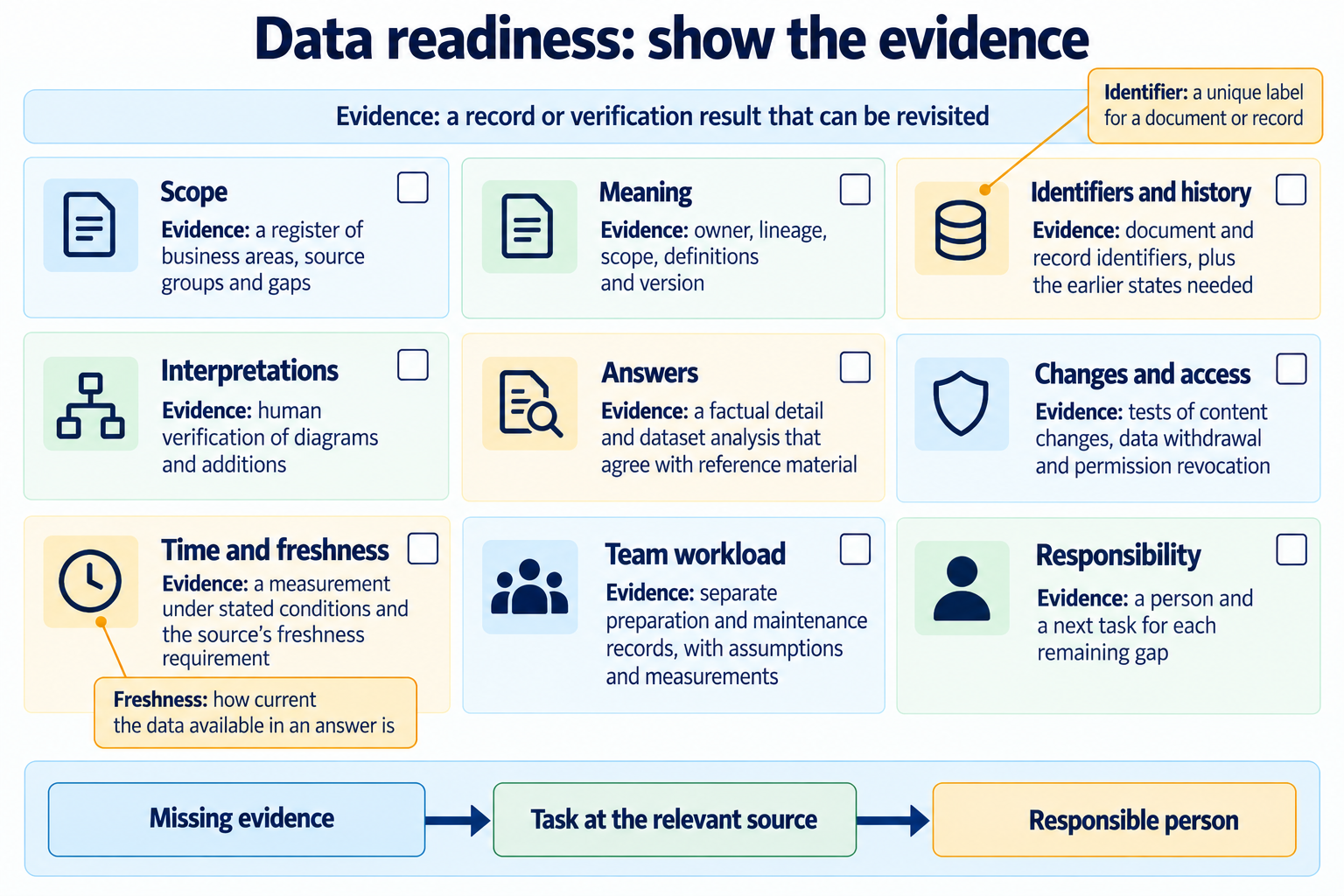
Any missing evidence goes back onto the work list for the relevant source. A company prepared in this way knows which data an agent can rely on, what is still missing and who is responsible for improvement. Its knowledge becomes a resource that can be found, checked and maintained as the company changes.